> For the complete documentation index, see [llms.txt](https://help.flowerbuddy.co/llms.txt). Markdown versions of documentation pages are available by appending `.md` to page URLs; this page is available as [Markdown](https://help.flowerbuddy.co/reference/tasks/delete-task-or-group.md).
# Delete a task or task group safely
Delete a task or task group only when the record and its related work should no longer remain in its current form. Before deletion, FlowerBuddy checks whether other tasks use the record as a completion-based due-date dependency.
## Delete a task
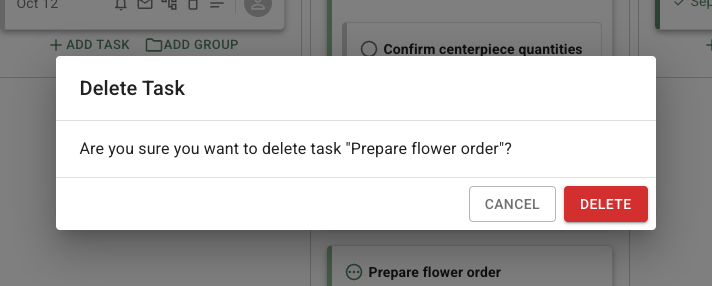
Select the task's delete icon and review the **Delete Task** dialog. If no other task depends on it, confirm **Delete Task**. The task is removed from the Tasks page.
Check the task name in the confirmation before deleting it. This example identifies the task that will be removed.
If other tasks depend on it, the dialog identifies those tasks and asks you to choose one replacement due-date rule for all of them. Select a new date source or dependency that belongs to the same event, then choose the dialog's delete action. The dependent tasks remain, but their due-date rule is reassigned.
Do not delete the task simply to clear an unresolved date. Complete or edit the dependency when the work still belongs in the event.
## Delete a task group
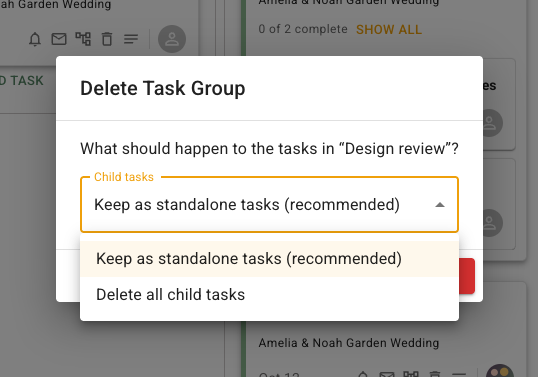
Select the group delete icon and review the **Delete Task Group** dialog. When the group has child tasks, choose one of these child-task options:
* **Keep as standalone tasks** leaves the child tasks in the event without the group.
* **Delete all child tasks** removes the child tasks with the group.
The group confirmation makes this choice explicit. Select the option that matches what should happen to the tasks before confirming deletion.
If a task depends on the group or its child tasks, FlowerBuddy can require a replacement due-date rule before deletion. Choose the replacement rule before confirming the delete action.
Deletion removes the selected record or group. Keeping child tasks as standalone tasks does not preserve the group relationship, so choose that option only when the group itself is no longer useful.