> For the complete documentation index, see [llms.txt](https://help.flowerbuddy.co/llms.txt). Markdown versions of documentation pages are available by appending `.md` to page URLs; this page is available as [Markdown](https://help.flowerbuddy.co/reference/purchasing/create-manage-orders/change-vendors-and-prices.md).
# Change purchasing vendors and prices
Planning prices on [Create & Manage Orders](/reference/purchasing/create-manage-orders.md) are the buying-cost assumptions used by the included recipes. They are separate from a client's selling price and from the price saved on an individual purchase order.
## Change one item's price or wholesaler
1. Retrieve the records you want to work with and open **Summary**.
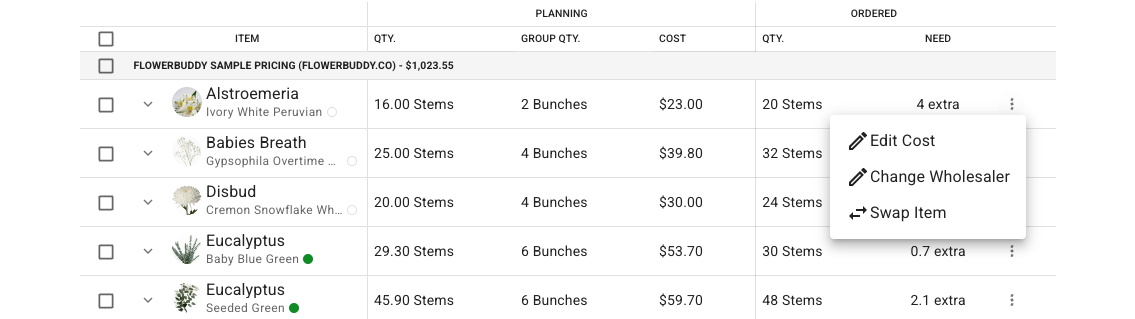
2. Open the three-dot menu at the right of the item's row.
3. Choose **Edit Cost** or **Change Wholesaler**.
Both choices open the item's pricing controls. The menu belongs to the whole combined item row, not just one recipe.
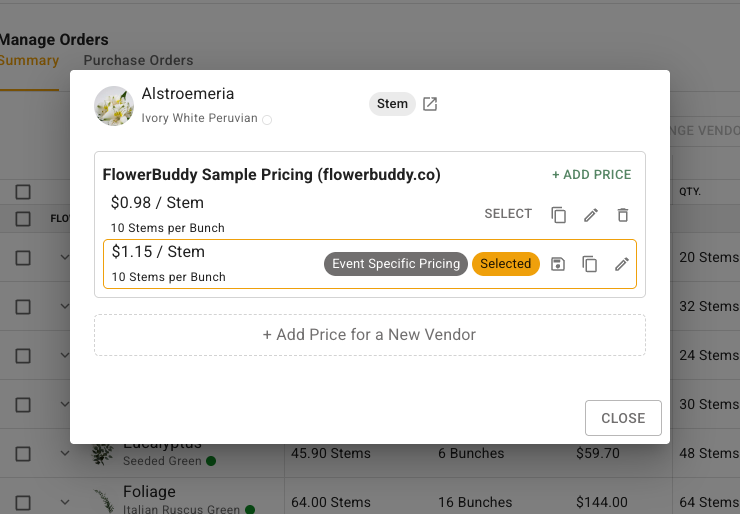
Under the correct wholesaler location, click **Select** beside the price you want to use. To change a price amount or group size, click its pencil icon, check the fields in **Edit Price**, then click **Update**. For example, a price for a ten-stem bunch is different from the same price per stem.
Check the scope before editing a shared price. The editor warns when a change will update all active events that use that price. Use **Create event specific pricing**, when available, for a price that should not replace the shared Core Data price.
The pricing dialog separates the available buying-price choices from the selected price for these recipes.
Changing a planning price here updates that item across the retrieved events and plans. To change only what you paid on one order, [edit the purchase order](/reference/purchasing/orders/edit-order-details-and-items.md) instead.
## Change several vendors together
Select the checkboxes beside the items, then click **Change Vendor**. A vendor-heading checkbox selects that vendor's items; the heading checkbox selects all listed items. In **Change Vendor for Selected Items**, choose the wholesaler location, review the listed items, and click **Change Vendor**.
Check the resulting prices as well as the vendor name. A different supplier may use different prices or buying-group quantities.
## Replace an item
Choose **Swap Item** from the item's three-dot menu, select the replacement flower or hard good, and click **Swap**. This replaces the input in the retrieved recipes, rather than merely changing a line on an export. Check the included records and resulting recipe costs before making a substitution across several events.
Price controls can be unavailable when your role does not allow editing buying costs.