> For the complete documentation index, see [llms.txt](https://help.flowerbuddy.co/llms.txt). Markdown versions of documentation pages are available by appending `.md` to page URLs; this page is available as [Markdown](https://help.flowerbuddy.co/reference/inventory/inventory/pull-return-and-sell-inventory.md).
# Pull, return, and sell inventory
Use **Pull** and **Restock** to record ordinary movement of physical inventory. They are internal records, not a rental agreement, checkout, or payment collection action.
## Pull an item
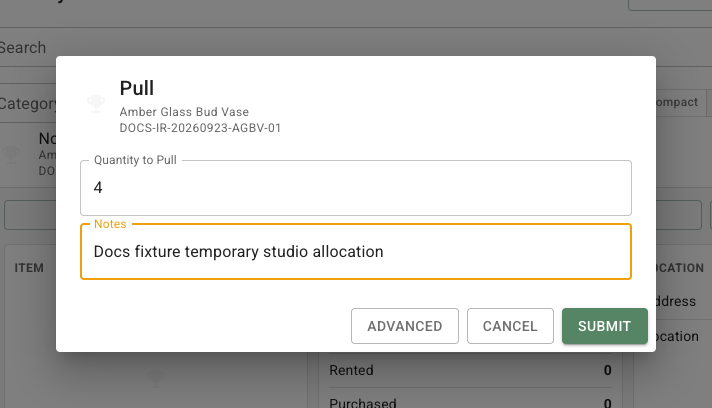
Find the item on **Inventory**, expand its row, and select **Pull Item**. Choose **Associated Event** when the pieces are leaving for a specific event. Select **Pull to Rent** when there is no event allocation, then enter the quantity and a note when it helps the next teammate. Select **Submit** when the preview is correct.
The quantity moves from **In Stock** to **Rented**. For example, pulling six bud vases for the Morgan wedding reduces In Stock by six and records six as rented for that event. FlowerBuddy prevents a pull that would make In Stock negative.
## Return, lose, or sell an item
Select **Return Item** from the same expanded row when rented items return. The dialog is titled **Restock**. Choose the event or **General / Unassigned** source when asked, enter the quantity being put back into stock, and enter lost, stolen, or damaged pieces separately when part of the pull cannot return. Select **Submit** after reviewing the after quantities. Returned pieces move from Rented to In Stock. Lost pieces reduce both Rented and Total.
The **Pull Item** dialog can also record items sold. Select **Pull to Sell**, then enter the quantity leaving stock and the quantity sold. A sold item leaves In Stock and reduces Total instead of remaining Rented. For example, pulling four vases and recording one sold leaves three Rented and reduces Total by one. Review the resulting **Pull** or **Restock** row in [Log](/reference/inventory/log.md), especially when an event allocation or loss is involved.