> For the complete documentation index, see [llms.txt](https://help.flowerbuddy.co/llms.txt). Markdown versions of documentation pages are available by appending `.md` to page URLs; this page is available as [Markdown](https://help.flowerbuddy.co/reference/forms/form-editor/form-fields/configure-location-fields.md).
# Configure location fields
Use **Location** to collect one venue or address, or **Locations** to let recipients add several places with optional notes. These questions collect places without asking for a date or time. Use [timeline fields](/reference/forms/form-editor/form-fields/configure-recipe-and-timeline-fields.md) when you need scheduled activities instead.
## Collect one location
1. In **Form Fields**, select **Add Field** and choose **Location**.
2. Select **Add Location**.
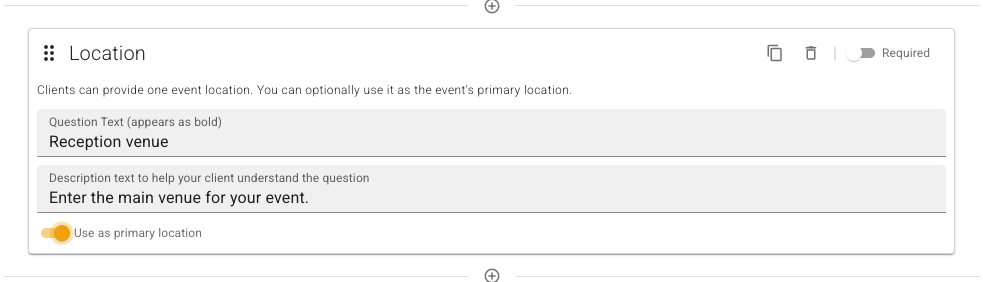
3. Enter **Question Text (appears as bold)**, such as "Reception venue", and a description when helpful.
4. Turn on **Required** when every response must include the place.
5. Turn on **Use as primary location** when this answer should identify the main location of an event created from the submission.
Only one Location field in a form can be the primary-location source. Choosing it on another Location field switches the source to that field.
The field card keeps the primary-location choice alongside the question it applies to.
## Collect several locations
1. Select **Add Field**, choose **Locations**, and select **Add Locations**.
2. Enter the question and description, such as asking for ceremony and reception venues.
3. Turn on **Required** when recipients must add at least one location.
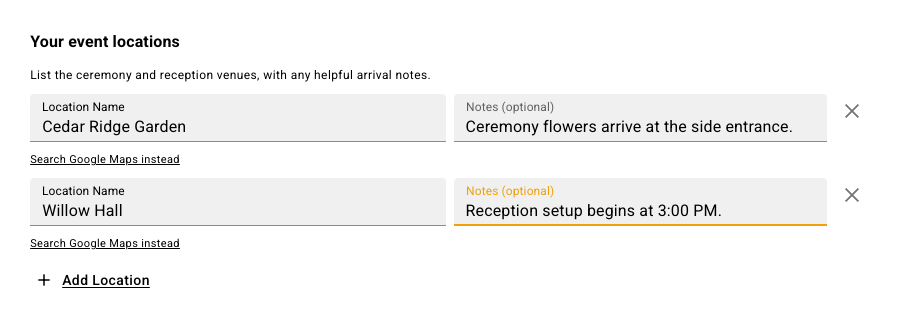
On the public form, recipients select **Add Location** for each place. Each row has a location, **Notes (optional)**, and a remove control. Every added row needs a selected Google Maps result or a manually entered location name; notes remain optional. This field does not have **Use as primary location**.
For example, recipients can list two venues and give separate arrival instructions for each one.
## Review location answers
Recipients can select a Google Maps search result or use **enter location manually** to enter a **Location Name**. Typing search text without selecting a result does not confirm a map location. **Search Google Maps instead** switches back to search.
[Preview the public form](/reference/forms/public-form/preview-a-public-form.md) to check the wording and answer controls before sharing it.
When you [create an event from the submission](/reference/forms/form-submissions/create-an-event-from-a-submission.md), these answers become [event locations](/reference/event-page/details/manage-event-locations.md). A single Location question's text supplies context in the event-specific notes. A Locations answer uses the recipient's notes when provided, or the question text otherwise. Repeated references to the same place share one event location, combining distinct notes.
The selected primary-location source sets the primary place when it has an answer. Review the created event's **Locations** list and **Primary** badge before using that information for planning or reporting.