> For the complete documentation index, see [llms.txt](https://help.flowerbuddy.co/llms.txt). Markdown versions of documentation pages are available by appending `.md` to page URLs; this page is available as [Markdown](https://help.flowerbuddy.co/reference/events/assign-team-members-and-tags.md).
# Assign team members and tags from the Events page
Use assignees and tags to add useful context to event rows. Assignees identify workspace members or event-role assignments connected to the event. Tags provide labels that help organize and filter the collection.
## Assign a team member or event role
On the **Events** page, find an event you can edit and open its **Assignees** control. Choose a workspace member to assign directly, or choose a configured event role and assign an available member to that role. Existing assignments remain visible on the row.
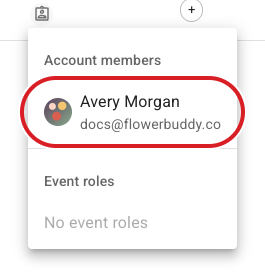
The open **Assignees** menu shows the workspace members available for the event. When event roles are configured, they appear in the separate **Event roles** section.
Remove an assignment when that person or role should no longer be associated with the event. The event remains in the collection after an assignment is removed.
## Add or remove a tag
Use the **Tags** control on the same event row to add an existing text tag or create a new one when that option is available. The tag appears with the event and can help you narrow the collection later. Remove a tag when it no longer describes the event.
The tag dialog is where you choose an existing tag or enter a new text tag for the event.
Assignees and tags organize the record without changing its main status, price, contract, or payment information. If a role or member is unavailable, choose from the members and roles shown in the control.
## Confirm the assignment
After the change succeeds, the event row shows the selected person, role, or tag. Use **Search** or the collection filters to find the event by that value.