> For the complete documentation index, see [llms.txt](https://help.flowerbuddy.co/llms.txt). Markdown versions of documentation pages are available by appending `.md` to page URLs; this page is available as [Markdown](https://help.flowerbuddy.co/reference/event-templates/editor/details/payments-and-contract.md).
# Configure payments and contract content in a template
The template **Details** tab can hold a payment schedule, invoice settings, reusable payment notes, and contract content. These are definitions for a future event. They are not a payment record, a generated client document, or a signature.
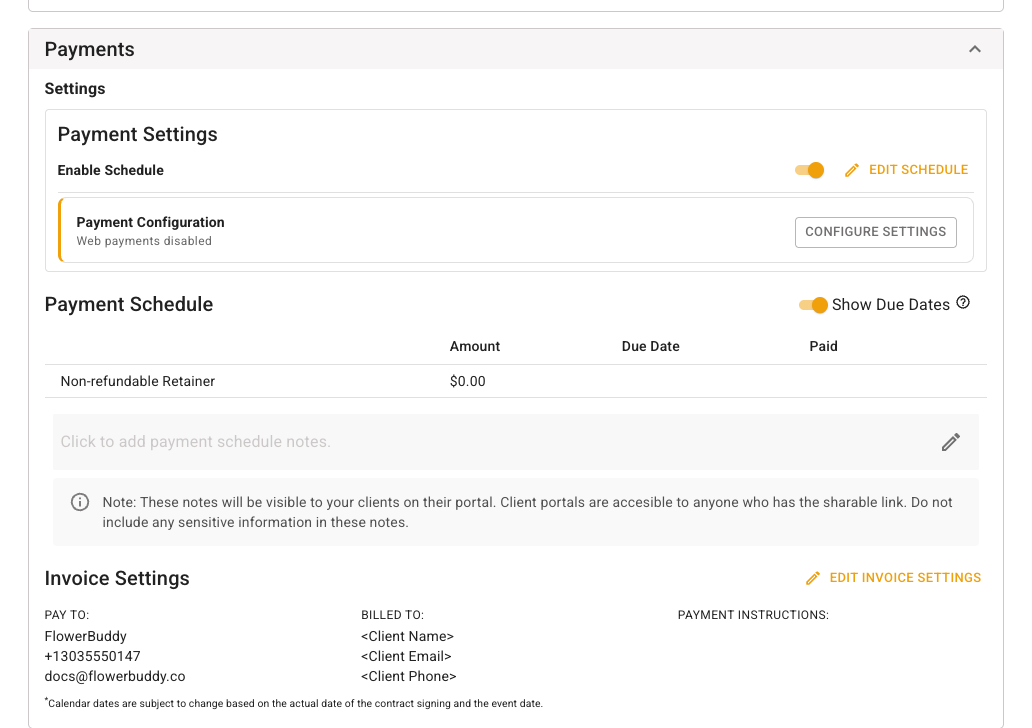
The **Payments** section below shows a reusable schedule with a non-refundable retainer, due-date display, and invoice settings. The payment controls are separate from the **Contract** section beneath them.
## Payment schedule and invoice settings
Use **Edit Schedule** to define scheduled payment names, amounts, and due rules that a new event may start with. Use **Configure Settings** for payment preferences such as available payment methods and tips when those features are enabled. **Invoice Settings** controls the reusable pay-to, billed-to, and payment-instruction content used for invoices.
Payment schedule notes can be visible through a Client Portal shareable link. Keep those notes generic for client access. For shared event payment instructions, see [Manage invoices, payments, and receipts](/reference/event-page/details/manage-invoices-payments-and-receipts.md).
## Contract content and signer settings
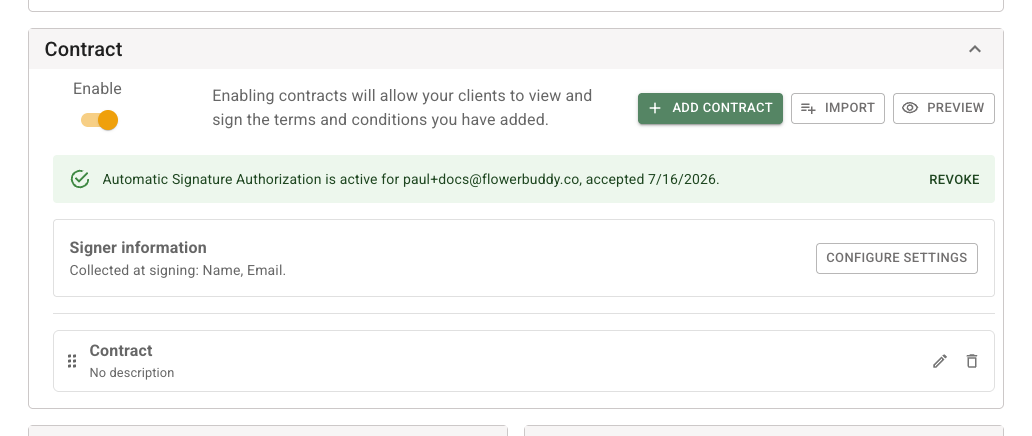
The **Contract** section has its own reusable document controls and signer settings.
In **Contract**, use **Enable** when future events should start with contracts available. Use **Add Contract** or **Import** to prepare reusable terms, and **Preview** to review them. **Configure Settings** controls signer information collected when a real client signs.
Keep client-specific names, signed documents, and generated contracts out of the reusable setup. A template can provide contract content, but a new event still needs its own client and signer review. See [Prepare an event contract](/reference/event-page/details/prepare-event-contract.md) for the shared contract editor.
Creating a template does not charge a payment method or authorize a signature. When applying a template to an existing event, paid payments and generated contracts can restrict replacement choices. [Apply an event template](/reference/event-page/details/apply-event-template.md) explains those protections.