> For the complete documentation index, see [llms.txt](https://help.flowerbuddy.co/llms.txt). Markdown versions of documentation pages are available by appending `.md` to page URLs; this page is available as [Markdown](https://help.flowerbuddy.co/reference/event-page/details/write-event-notes.md).
# Write event notes
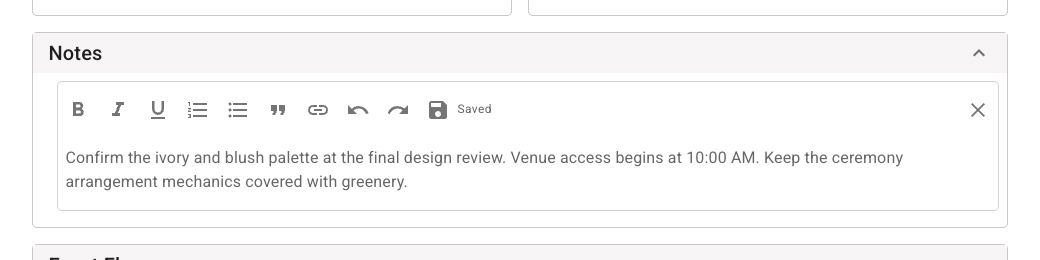
Use **Notes** for internal context your team needs while planning the event. For example, you might record venue access instructions, a design decision to confirm, or the location of supplies that are already reserved.
## Add or edit a note
1. Open the event and select **Details**.
2. Expand **Notes**.
3. Select the note preview or **Event notes...** placeholder.
4. Enter the information your team needs.
5. Use the editor controls to add emphasis, lists, a quotation, or a link when that makes the note clearer.
6. Wait for **Saved**, then select **Save and Close** to finish editing.
The editor opens inside the **Notes** section and saves changes automatically. Keep client-facing instructions in the fields described below instead of placing them in this internal note.
The saved text appears as a preview in the **Notes** section. Select the preview again when you need to revise it.
## Check that your note is saved
The editor shows **Not Saved** while changes are waiting, **Saving…** while saving, and **Saved** after the save succeeds. You can select **Save** to save the current text without closing the editor. **Save and Close** saves before closing it.
If you see **Couldn’t save. Retry**, keep the editor open, check your connection, and select that message to try again. The draft remains in the open editor. Wait for **Saved** before refreshing, closing the browser tab, or switching devices.
## Resolve conflicting edits
Another person or another open session can change the same note while you are editing. If the editor shows **Conflict detected. Review changes**, select it to open **Review updated notes**.
Compare **Latest saved notes** with **Your draft**. Then choose how to continue:
* Edit **Combined version** to include the text you want to keep from both versions, then select **Save combined version**. Review the combination yourself; it is not an automatic merge of both drafts.
* Select **Use latest saved version** to keep the saved version and discard your draft.
* Select **Close** to return without resolving the conflict yet.
After resolving the conflict, check the saved note again before leaving the page. The same save and conflict controls apply to the rich-text editors used for recipe notes and proposal notes.
The review dialog keeps the latest saved notes and your draft visible while you prepare the combined version below them.
## Choose the right place for notes
Event notes are different from other text fields in FlowerBuddy:
* Payment schedule notes appear with the payment schedule in the Client Portal. FlowerBuddy warns that those notes are visible to anyone with the shareable link.
* Invoice notes and payment instructions appear in generated invoices.
* Contract sections contain agreement terms.
* Proposal text is part of the presentation shared with the client.
Do not rely on **Notes** to send information to a client. Put agreement terms in **Contract**, proposal content in **Proposal**, invoice instructions in **Invoice Settings**, and client-visible schedule context in the payment schedule notes.
Event edit access is required to change the note. A person with view access can read the saved note, but the editor is unavailable when they cannot edit the event.