> For the complete documentation index, see [llms.txt](https://help.flowerbuddy.co/llms.txt). Markdown versions of documentation pages are available by appending `.md` to page URLs; this page is available as [Markdown](https://help.flowerbuddy.co/reference/event-page/details/manage-event-locations.md).
# Manage event locations
The **Locations** list in **Details > Contacts & Locations** keeps the places associated with an event together, even when you do not yet have a schedule. Each place can have event-specific notes, and one can be marked as the primary location.
For example, add the ceremony and reception venues first, then use [the timeline](/reference/event-page/details/plan-event-timeline.md) to schedule setup, delivery, and collection at those places. A saved location describes the reusable venue; a timeline item describes an activity at a particular time.
## Add a location to the event
1. Open the event and select **Details**. If the event is locked, [unlock it](/reference/event-page/overview/lock-or-unlock-event.md) before changing locations.
2. Expand **Contacts & Locations** and select **Add Location** under **Locations**.
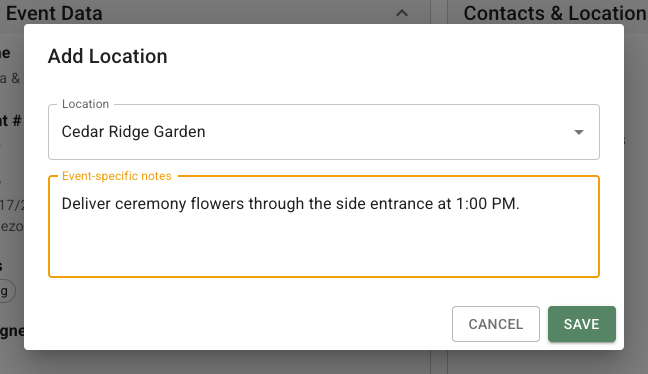
3. Choose a saved **Location**. Places already used in the timeline appear under **Timeline locations**. Locations already in this event's list are not offered again.
4. Enter **Event-specific notes**, such as the delivery entrance or this event's setup instructions.
5. Select **Save**.
The dialog keeps the selected place separate from the notes that apply only to this event.
If your search has no match, select **Add location?** to create a saved place, then save its association with the event. See [Manage locations](/reference/core-data/locations/manage-locations.md) for reusable addresses, contact details, and shared location notes.
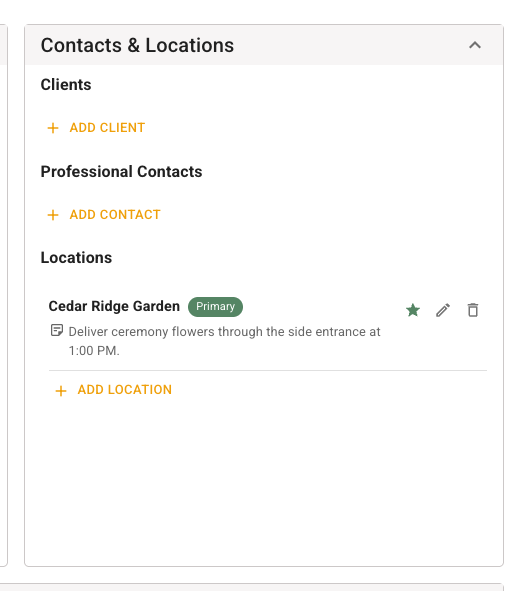
The saved place appears under **Locations** with any saved address and event-specific notes. The first location added to this list is automatically marked **Primary**.
## Choose the primary location
Select the outline star beside a location, labeled **Make primary location**, to mark it as **Primary**. Only one location can be primary. Selecting another location's star moves that designation to the other place.
Select the filled star, labeled **Remove primary location**, to clear the designation. The [Events report](/reference/reports/events.md) shows the selected place in **Primary Location**, or leaves the column blank when none is selected.
The primary designation identifies the main place for the event. It does not create a scheduled activity or control proposal visibility. Use the timeline's **Show in Proposal** setting for the activities clients should see.
## Edit or remove an event location
Select **Edit event location** beside the place to choose a different saved location or change **Event-specific notes**, then select **Save**. These notes belong to this event, not to the reusable location in Core Data.
Select **Delete event location**, review **Remove Event Location**, and select **Delete** to remove the place from this list. This does not delete the saved location or a timeline item that uses it. Removing the primary location clears that designation; select another place's star to set a new primary location.
[Build recipe location choices](/reference/event-page/build/recipe-details-and-locations.md#choose-a-recipe-location) include places in this list and places used by timeline items, with each place listed once. A place can therefore remain available in Build through the timeline after you remove it from the separate Locations list.
Changes require event edit access and an unlocked event.