> For the complete documentation index, see [llms.txt](https://help.flowerbuddy.co/llms.txt). Markdown versions of documentation pages are available by appending `.md` to page URLs; this page is available as [Markdown](https://help.flowerbuddy.co/reference/dashboard/set-and-review-workspace-goals.md).
# Set and review workspace goals
The **Goals** section on the Dashboard compares progress from Booked and Completed events with a yearly target. Set values that describe the result you want from your business, then use the progress view to compare those values with event results.
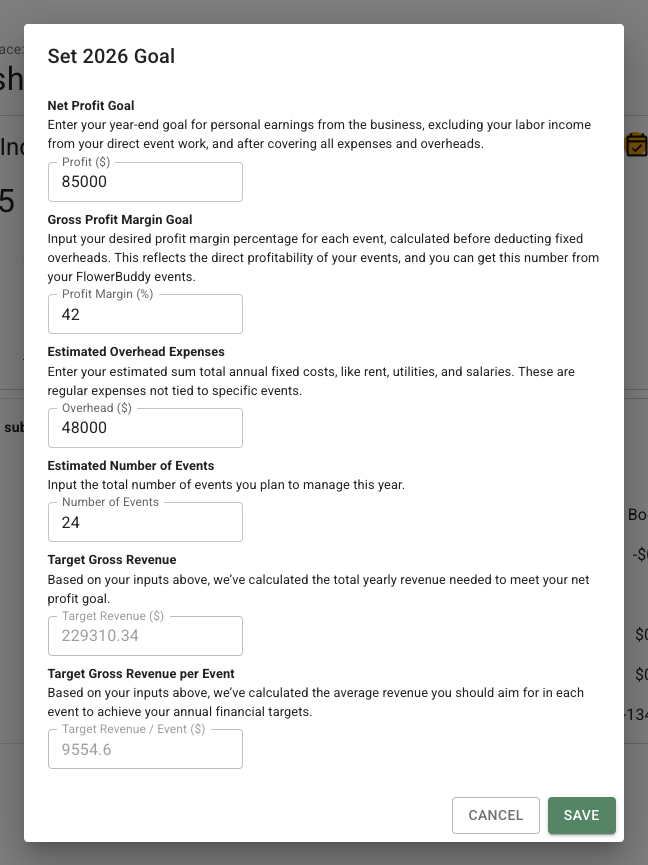
Select **Set \[year] Goal** when the selected year has no goal, or select the edit icon beside an existing goal. The dialog below shows the editable inputs and the two values FlowerBuddy calculates from them.
## Choose a goal year
Use the **Year** menu in the Goals section to choose the listed goal year you want to review. The selected year determines which goal record is read or saved.
When no goal exists for the selected year, the section explains that no goal is set and shows **Set \[year] Goal**. When a goal exists, the section shows its saved values and progress.
## Enter goal values
The goal dialog includes four editable values:
* **Profit:** Your target annual profit after expenses and overhead. The dialog describes this as personal earnings from the business, excluding labor income from direct event work.
* **Profit Margin (%):** The target profit margin as a percentage of revenue before fixed overhead is deducted.
* **Overhead:** Your estimated annual fixed costs, such as rent, utilities, and salaries.
* **Number of Events:** The target number of events for the year.
These values describe your business target. FlowerBuddy does not prescribe a rate or number of events.
## Review calculated revenue targets
FlowerBuddy calculates two read-only values from the four inputs:
* **Target Revenue:** The annual revenue needed to meet the profit and margin target after overhead.
* **Target Revenue / Event:** The target revenue divided by the target number of events.
The calculation is:
Target Revenue = (Profit + Overhead) / (1 - Profit Margin / 100)
Target Revenue / Event = Target Revenue / Number of Events
Review the calculated values before saving. They are planning targets, not a quote or a change to an event price.
## Save or edit a goal
Select **Save** to store the values for the selected year. Select **Cancel** to close the dialog without saving. To change a saved goal later, choose the year and select its edit icon.
Changing a goal changes the comparison target for that year. It does not change event prices, payment schedules, or existing event records.
## Read progress
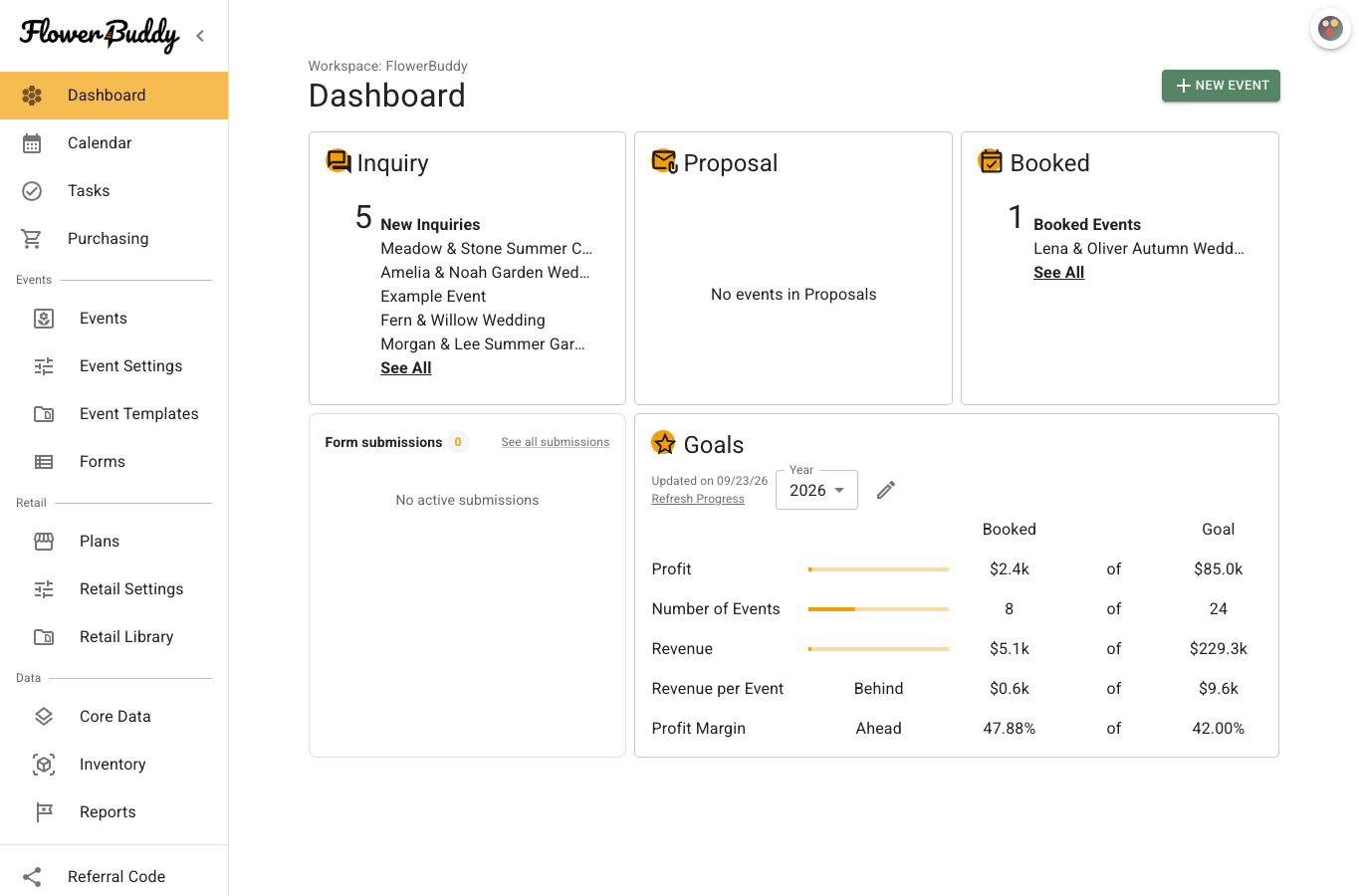
After a goal is saved, the Goals section compares booked and completed event results with the goal. It shows:
* **Profit**
* **Number of Events**
* **Revenue**
* **Revenue per Event**
* **Profit Margin**
The value columns show the current result and goal. The progress bars show progress toward value targets. Profit Margin uses a performance label such as **Ahead**, **Behind**, or **On Track** based on the current result compared with the target.
The example below shows refreshed progress for 2026. The **Booked** column shows eight events against a goal of 24, while the 47.88% profit margin is ahead of the 42% goal.
## Refresh progress
Select **Refresh Progress** to request current results for the selected year. FlowerBuddy calculates progress from Booked and Completed events for that year. The timestamp above the link shows when the displayed progress was last updated.
Refresh progress when event pricing, status, or other information used by the totals has changed. Refreshing does not edit your goal values.